
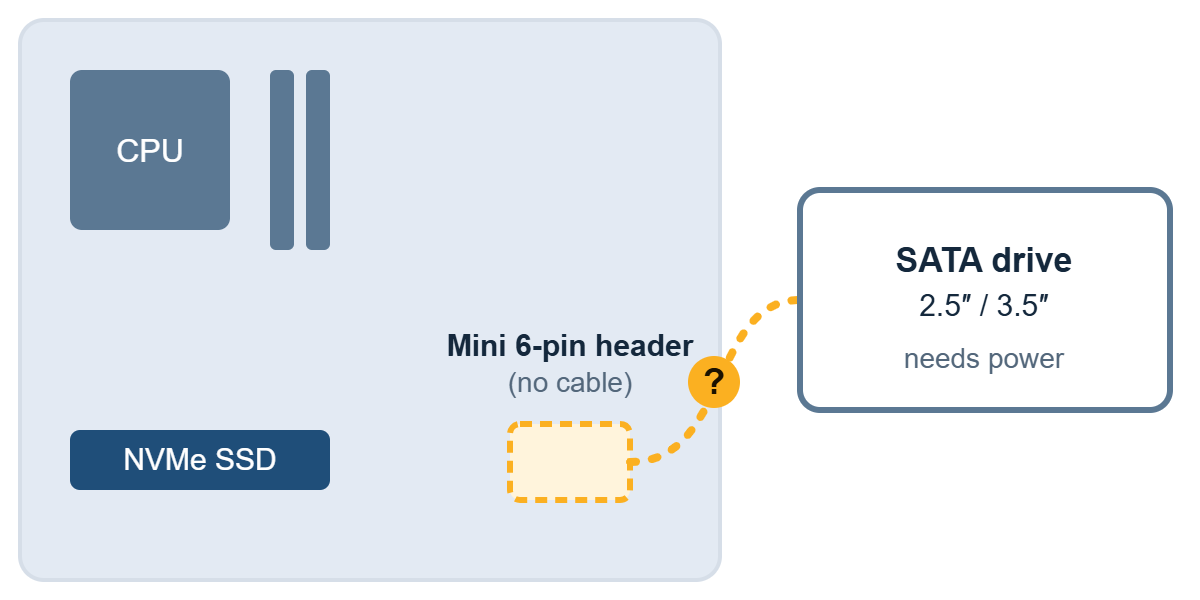
Newer Dell desktops such as the QCT, QCS, ECT and ECS 1250, 1255 and 1260 series are built around NVMe storage and, in the default configuration, ship without a SATA power cable. If you want to add a 2.5″ or 3.5″ drive, you need the right cable first. The wrong one can damage the motherboard.
Quick answer
- Newer Dell (QCT, QCS, ECT, ECS, 1250 / 1255 / 1260 series): you need a Mini 6-pin to SATA power cable.
- Older OptiPlex / Inspiron (for example OptiPlex 3040 to 3000 series): you need the older 6-pin SATA power cable.
Why your new Dell has no SATA power cable
Most current Dell business desktops are configured with a single NVMe SSD. With no SATA drive to power, the default configuration of the QCT, QCS, ECT and ECS 1250, 1255 and 1260 series does not include a SATA power cable. Newer models may follow the same pattern.
This catches many users out. You buy a spare HDD or SSD for extra storage, open the chassis, and find nothing to plug it into. A generic power supply cable will not fit either, because Dell uses its own connector on the motherboard.
Two cables that look alike and are not
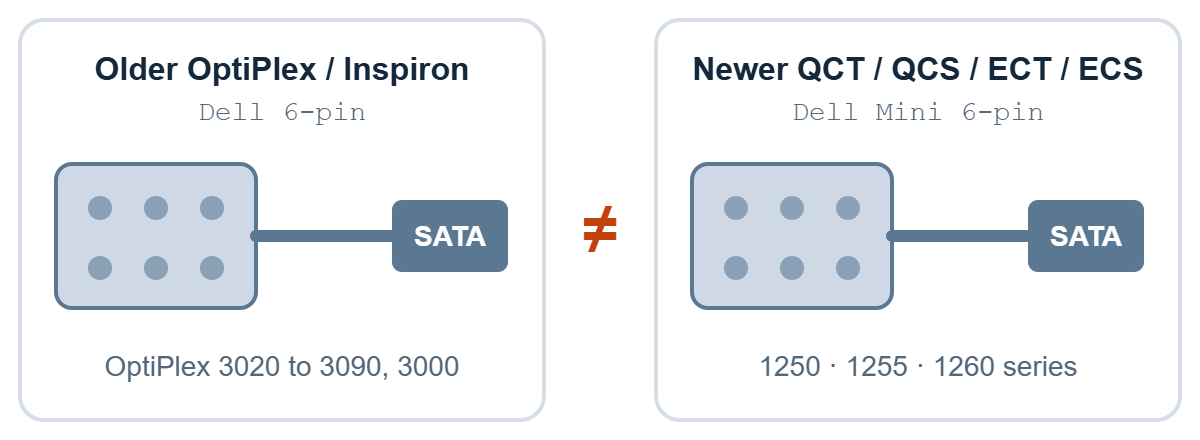
Both generations are described as “6-pin”, and the plugs look the same. The cables are still not interchangeable, so you cannot choose by how the plug looks. Choose by your Dell model or the DP/N.
- Older generation: OptiPlex 3020, 3040, 3046, 3050, 3060, 3070, 3080, 3090 and 3000 (SFF and MT), and older Inspiron desktops. Other older OptiPlex models, such as the 7000 series: send us a photo and we will confirm.
- Newer generation: QCT, QCS, ECT, ECS, QBT, QVS and Pro, 1250, 1255 and 1260 series.
Which cable should you order?
All four cables are in stock or available on order from NJ Bravo. Each product page lists the exact models it fits.
| Cable | Dell DP/N | Fits | SATA outputs | Type |
|---|---|---|---|---|
| Dell Mini 6-Pin to SATA Power Cable | 0YJW72 | QCT / QCS / ECT / ECS 1250 to 1260 series | 1 SATA + 1 mini SATA (optical drive) | Genuine Dell |
| Dell Mini 6-Pin to 1-SATA Power Cable | 05GPWK | QCT / QCS / ECT / ECS 1250 to 1260 series | 1 SATA | Genuine Dell |
| OEM Dell Mini 6-Pin to SATA Power Cable | No Dell part number | QCT / QCS / ECT / ECS / QBT / QVS / Pro 1250 to 1260 series | 1 SATA or 2 SATA (choose on the page) | OEM compatible |
| Dell PC 6-Pin SATA Power Cable | No Dell part number | Older OptiPlex (SFF / MT) and older Inspiron desktops | 1 SATA + 1 mini SATA power | OEM compatible |
The compatible-model lists differ slightly between listings. Check the list on the page for your exact model before you order.
How to choose between them
- One extra drive, original Dell part: the 05GPWK single-SATA cable.
- One SATA drive plus an optical drive, original Dell part: the 0YJW72 cable.
- Lower cost, or you need two SATA outputs: the OEM cable. Pick 2 SATA only if your chassis has a second drive bay.
- Older OptiPlex or Inspiron: the 6-pin cable, never the Mini 6-pin.
Check before you order
- Find your model. Read the model name on the chassis label or in Windows System Information. Note the full name and series.
- Look at the power header. Switch the PC off, unplug the power cord and open the chassis. If a cable is already installed, such as one for an optical drive, read the Dell DP/N printed on it. Do not choose by the plug alone, because both generations look the same.
- Count your drives. One extra drive needs a 1-SATA cable. Two need the OEM 2-SATA option. The cable carries power only, so also confirm that your chassis has a free drive bay and a SATA data connection.
- Still unsure. Send us the model name and a clear photo of the motherboard power header. We will check the part number and connector before you order.
Wrong cable, damaged motherboard
Using a cable from the wrong generation can damage the motherboard and in the worst case burn it. The plugs look the same, so a cable that fits is not proof that it is correct. Before installing:
- Switch off, unplug the power cord and wait a moment before opening the chassis.
- Choose by Dell model and DP/N, not by how the plug looks.
- Check that the Dell DP/N on your existing cable or board matches the part you ordered.
- If you are unsure, ask us before you order or install.
Our 3-month replacement warranty covers manufacturing defects. It does not cover damage from improper installation.
Other newer models
Some newer workstations use different cables again. The Dell Pro Max Tower T2 (FCT2250), for example, uses a Dell 8-pin to 2-SATA cable.
Not sure which one you need?
Send us your Dell model and a photo of the motherboard power header. We check the connector first and quote only the cable that fits. WhatsApp us, request a quote, or browse all assembly cables.
Related guides
 LENKENG LKV373 HDMI Extender: How to Check Your Version (V2.0, V3.0, V4.0) Before Buying7 min read
 Lindy USB Port Blockers: USB-A vs USB-C Buying Guide5 min read
 C13, C14, C19, C20 Power Cables Explained (Malaysia Guide)6 min read