
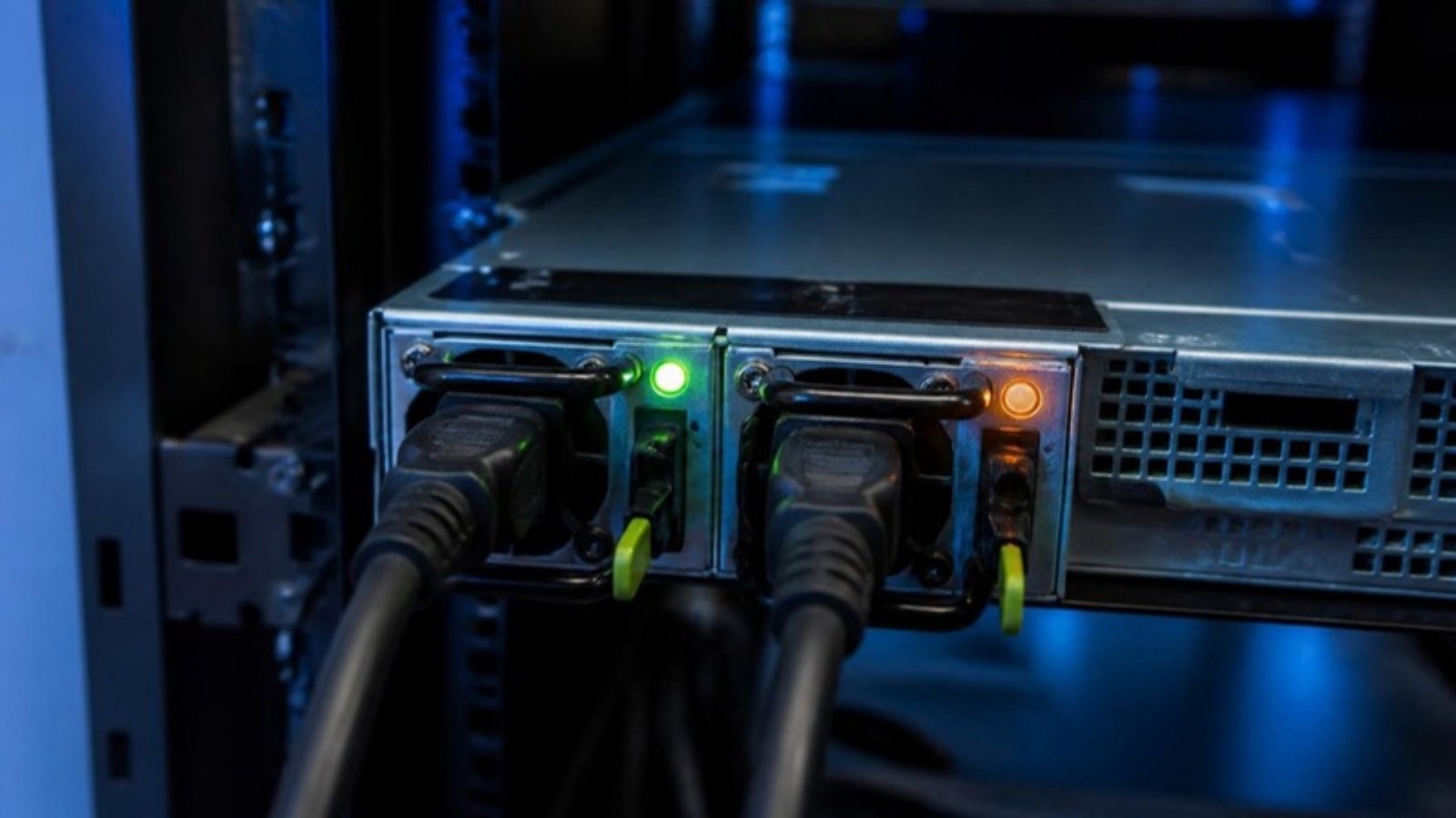
You walk into the server room and one of the power supplies has an amber or orange light instead of the usual green. The server is still running, so is it urgent? In most cases, yes. Your server has probably lost its power redundancy. If the second PSU fails, the whole machine goes down.
This guide explains what the common LED states mean on Dell PowerEdge and HP ProLiant power supplies, what to check before buying a replacement, and how to get the correct part quickly.
What the PSU LED Colours Usually Mean
| LED state | Typical meaning | Action |
|---|---|---|
| Solid green | AC power OK, PSU working normally | No action |
| Off | No AC input: cord unplugged, PDU/UPS outlet off, or PSU dead | Check the cord and outlet first |
| Solid or blinking amber | PSU fault: failed PSU, fan, or internal component | Check the logs, then plan a replacement |
| Blinking green (Dell) | Firmware update in progress, or PSU mismatch | Don’t unplug during an update; check the PSU wattage matches |
| Green and amber alternating (Dell) | PSU mismatch: different wattage or efficiency from the other PSU | Replace it with the same model as the working PSU |
Exact LED behaviour varies by server generation. Always confirm with the server’s own management log (see below).
Step 1: Rule Out the Simple Causes
- Power cord. Make sure it is firmly seated. Hot-swap PSUs usually use a C13/C14 cord, and larger PSUs (1100W+) often use C19/C20.
- Outlet / PDU / UPS. Plug the cord into a known-good outlet. A tripped PDU breaker often shows up as an amber PSU.
- Re-seat the PSU. On hot-swap models, pull the PSU out and push it back in until it clicks. Only do this if the other PSU is showing green.
Step 2: Check the Management Log
- Dell PowerEdge: iDRAC → System Event Log. Look for messages such as “Power supply 1 failed”, “PSU redundancy lost” or “Power supply mismatch”.
- HP ProLiant: iLO → Integrated Management Log (IML) or the Power Information page.
- If there’s no iDRAC/iLO access, the front LCD panel (on some models) or the LED on the PSU handle is your main indicator.
A “mismatch” message means the PSU itself may be fine but doesn’t match its partner (for example, 495W next to 750W). A “failed” message means the PSU needs replacing.
Step 3: Identify the Exact Replacement
Don’t order by wattage alone. Many PSUs share the same wattage but have different connectors, form factors or firmware. Before asking for a quote, collect:
- Server model (e.g. PowerEdge R730, ProLiant DL380 Gen9)
- PSU part number from the label (Dell example: 0GRTNK; HP example: 499249-001)
- Wattage, and the model of the PSU that’s still working
Not sure where to find it? See our guide: Where to find a server power supply part number.

Real Examples We Supply
These are common replacements for amber-light PSUs in Malaysian server rooms:
- Dell 495W hot-swap PSU GRTNK: PowerEdge R530 / R630 / R730 / R640 / R740 / T430 / T440
- Dell 750W hot-swap PSU F9F51: PowerEdge R620 / R720 / T320 / T420 / T620
- Dell 570W hot-swap PSU VPR1M: PowerEdge R610 / R710
- Dell 550W hot-swap PSU M95X4: PowerEdge R320 / R420
- HP 460W Common Slot PSU 499249-001: ProLiant G6 / G7 series
Browse the full range: Server Power Supplies.
Can I Keep Running on One PSU?
Technically yes, as long as the remaining PSU can carry the load. But you have no redundancy, and a single PSU running at a higher load ages faster. Treat an amber PSU as a planned replacement within days, not months, especially for production servers.
Frequently Asked Questions
Can I replace a hot-swap PSU without shutting down the server?
Yes. On redundant hot-swap systems you can replace the failed PSU while the server runs, provided the other PSU is healthy (green).
Can I use a higher-wattage PSU as a replacement?
Mixing wattages usually triggers a mismatch warning. Best practice is to match the existing PSU, or replace both as a pair.
My PSU is off, not amber. Is it dead?
Not necessarily. Check the cord and outlet first. If AC is confirmed and the LED is still off, the PSU has most likely failed.
My server model is old or discontinued. Can I still get a PSU?
Often yes. Sourcing end-of-life parts is our specialty. See how we source discontinued IT parts.
Need a Replacement Fast?
Send us the server model, a photo of the PSU label and the quantity you need. We’ll confirm compatibility before you order. Request a Quote or WhatsApp +607-359 6955.
Related guides
 Dell PSU Part Numbers Explained (DPN, 0-Prefix, DPS/L/D Models)4 min read
 Where Is the Part Number on a Server Power Supply?4 min read
 Server PSU Compatibility Guide: What Malaysian IT Teams Need to Know7 min read