
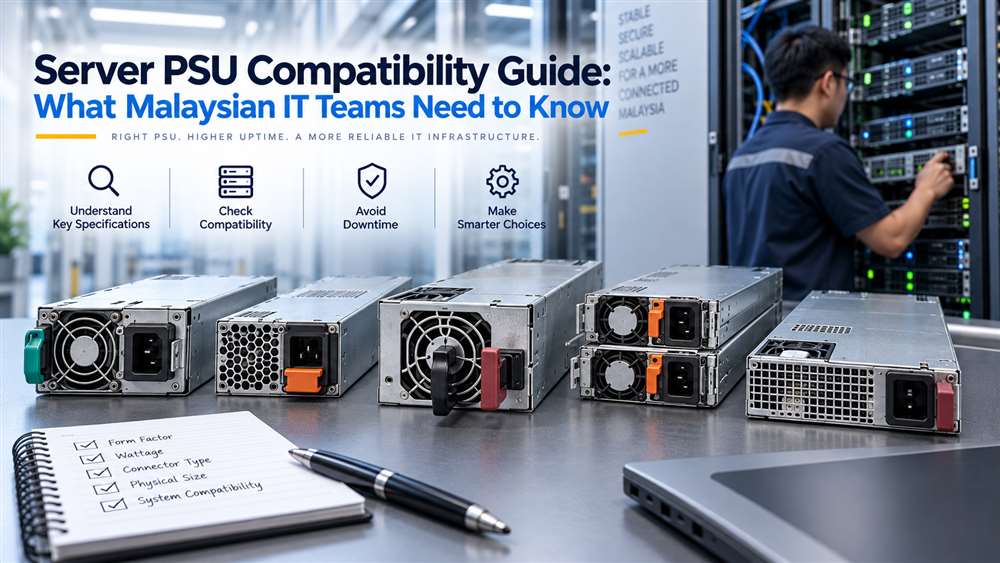
This guide helps buyers identify the server details needed to source a compatible replacement PSU. It is useful when a server power supply fails or a business needs a verified spare.
A server power supply unit is not a generic interchangeable component. This guide is designed for IT managers, system administrators and procurement teams responsible for maintaining business infrastructure. Whether the requirement is a planned replacement, a spare for critical hardware or support for an older server, compatibility should be checked before an order is raised.
A PSU mismatch can prevent a server from starting, trigger system alerts, affect redundant power operation or create an avoidable outage. In Malaysia, where replacement lead times can influence operational continuity, accurate identification is especially important for branch offices, data rooms, manufacturing systems and enterprise IT environments.
Start With the Exact Server Model
The server’s exact make, model and existing PSU reference should form the basis of every purchase request. “Dell server PSU” or “HP power supply” is usually not enough information for a compatibility assessment.
Collect the following details:
- Server manufacturer and complete model
- Chassis type and generation
- Existing PSU part number or spare part number
- PSU wattage and input/output label details
- Whether the server uses redundant power supplies
- Quantity of PSUs currently installed
- Photographs of the PSU label and connector side, if available
- Urgency and intended deployment location
If the existing PSU has failed, the label may still be readable after removal. If it is not, the server’s service information, maintenance records or system management interface may provide useful references.

Understand Form Factor and Mechanical Fit
A server PSU must fit the physical chassis correctly. Rack servers, tower servers, blade systems and storage appliances may use distinctly different PSU designs.
Key mechanical checks include:
- PSU dimensions and handle position
- Location of locking mechanisms
- Airflow direction
- Connector placement
- Hot-swap or fixed-install design
- Chassis bay arrangement
Two power supplies with similar wattage are not necessarily interchangeable. A unit may be electrically capable in theory but still fail to fit the server bay or connect to the internal power distribution board.
For hot-swappable systems, it is also important to confirm whether the replacement is intended for the same server generation. Manufacturers may change physical and electrical designs between server generations, even when product names appear similar.
Verify Electrical Requirements
PSU wattage is a useful reference but should not be treated as the only requirement. The power supply must support the server’s configuration, including processors, memory, storage drives, RAID controllers, network cards, accelerators and other installed components.
A lower-capacity replacement may not provide enough headroom for the configured hardware. This can result in power warnings, failed startup attempts or restricted operation. Conversely, selecting a higher-capacity unit without checking compatibility may still be unsuitable due to chassis, firmware or connector differences.
Procurement teams should also verify the input power environment. Malaysian facilities commonly operate on mains power appropriate for enterprise equipment, but the PSU label and local electrical installation should still be reviewed. For server rooms with UPS systems, ensure that the combined server load is considered during planning.

Redundant PSU Systems Require Extra Attention
Many business servers are configured with redundant PSUs. In a redundant setup, more than one PSU shares the load so that the server can continue operating if one supply fails, subject to the server design and power configuration.
When replacing one unit, check:
- Whether the remaining installed PSU has the same reference
- Whether both units are expected to match in capacity and type
- Whether the server supports mixed PSU configurations
- Whether the replacement will be used as an active unit or cold spare
- Whether the server has reported any power redundancy alerts
Mixing different PSU models without verification can lead to loss of redundancy, warning messages or inconsistent system behaviour. The practical approach is to match the existing PSU reference wherever possible.
For critical infrastructure, it is prudent to replace a failed unit promptly rather than continue operating indefinitely without redundancy.
Firmware, Management Alerts and Vendor-Specific Designs
Modern servers may monitor power supply health through system management tools. A physically installed PSU may still generate alerts if the system does not recognise it as compatible.
Common signs of an issue include:
- PSU status shown as degraded or unavailable
- Power redundancy warning
- Fan speed changes
- Hardware inventory alerts
- Server refusing to power on after installation
These issues are not always caused by a defective PSU. They can result from an incorrect part, an unsupported generation or an incompatible revision. Give the supplier as much identification information as possible so that the proposed replacement is assessed against the actual server configuration.
Planning Spares for Business Continuity
For organisations operating multiple similar servers, standardised spare planning can reduce downtime. Keep a record of installed server models, PSU part references, redundancy status and physical locations.
Consider holding a spare PSU when the server supports an important business system, such as:
- File and backup services
- Production databases
- Virtualisation hosts
- Network management platforms
- Factory or warehouse applications
- CCTV or access-control recording systems
The appropriate spare quantity depends on the criticality of the system, equipment age and service strategy. There is no universal answer, but a documented plan is preferable to sourcing only after a failure occurs.
Frequently Asked Questions
Can I replace a server PSU using only the wattage rating?
No. Wattage alone does not confirm compatibility. Check the server model, PSU part number, physical form factor, connector arrangement and redundancy requirements.
Should both redundant server PSUs be identical?
In most cases, matching installed units is the safer approach. Verify the server manufacturer’s compatibility guidance before mixing PSU models or capacities.
What should I provide for a server PSU quotation?
Provide the server make and model, existing PSU part number, PSU label photo, redundancy setup and required quantity. This helps avoid incorrect replacement selection.
Verified Server PSU Examples
These products illustrate how wattage, part number, physical design, connector and server family all affect compatibility.
| Model / P/N | Wattage and design | System and compatibility note |
|---|---|---|
| Dell PF3TR / NH493 / N238P 305W server PSU | 305W fixed, non-hot-swap | PowerEdge T100/T105. For T110, verify the existing DP/N and L305P-01 model. |
| Dell M95X4 550W hot-swap server PSU | 550W hot-swap, redundant | PowerEdge R320/R420; requires the matching hot-swap PSU bay and DP/N. |
| Synology / Delta DPS-500AB-9C hot-swap PSU | 500W hot-swap, redundant | Selected Synology RackStation and expansion systems; verify the exact NAS model and PSU reference. |
Important: These examples are identification references, not a universal compatibility list. Match the installed PSU reference and complete system model before ordering.
Related Buying and Sourcing Resources
Browse server power supplies in our catalogue, or see our guides on sourcing discontinued or hard-to-find IT and industrial parts and choosing a replacement laptop power adaptor. For the full collection, visit NJ Bravo’s Buying Guides.
Send the server brand/model, PSU part or spare number, revision, wattage, connector details or photo, quantity and delivery location in Malaysia. NJ Bravo can then assess available sourcing options against the information provided.
Related parts in our shop
Server power supplies we regularly supply in Malaysia:
- Dell 495W hot-swap PSU GRTNK: PowerEdge R530 / R630 / R730 / T430 / T440
- Dell 750W hot-swap PSU F9F51: PowerEdge R620 / R720 / T320 / T420 / T620
- Dell 570W hot-swap PSU VPR1M: PowerEdge R610 / R710
- Dell 500W hot-swap PSU 60FPK: PowerEdge R410
- Dell 450W PSU H3DKF: PowerEdge T430 / R530
- Dell 350W PSU HMNXX: PowerEdge T330 / T340 / T350
- HP 460W common slot PSU 499249-001: ProLiant Gen8 / Gen9
Can’t see your part? Send us the part number and we will source it for you.
Related guides
 Dell PSU Part Numbers Explained (DPN, 0-Prefix, DPS/L/D Models)4 min read
 Server PSU Amber Light: What It Means & What to Do4 min read
 Where Is the Part Number on a Server Power Supply?4 min read